Information Note — This guide explains how free testing works inside the app. We are an independent help website. Free items are given out randomly by the system and available stock is limited.
Why Do Many People Miss Out?
Thousands of active users try to get samples every week. Most fail to win because they skip saving their body size, enter requests right before the weekly clock resets, or post low-quality photos.
To increase your chances, save your exact sizes in your settings, request items right when the new list comes out, and publish honest reviews with bright images.
What Is the Free Testing Feature?
It is a section inside the app built to collect real buyer opinions. When you get picked, the order is shipped to your home for free, and your only job is to share your true thoughts.
The item list is refreshed every 7 days. The platform chooses winners by checking account details, request speed, and the quality of past reviews.
Items You Can Choose From
There are hundreds of options across various departments, from casual clothing to helpful home gadgets.
Along with shirts, skirts, jeans, and coats, you can regularly find beauty creams, makeup sets, room containers, and small decorations.
Available Item Types:
• Men’s and Women’s Clothes: Dresses, tops, trousers, jackets, and sleepwear.
• Beauty & Skincare: Eyeshadow palettes, lip glosses, skin lotions, and hair accessories.
• Accessories: Handbags, rings, necklaces, belts, and hats.
• Household Items: Cooking gear, pillowcases, and storage boxes.
1
Navigate to the Sample Area
Open the app on your phone. Head to your Profile tab, scroll down to More Services, press Other Services, and tap Free Trial Center to see current offers.
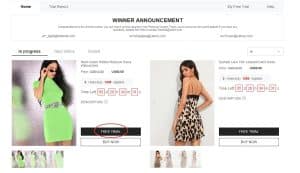
Easy steps to reach the free product dashboard
2
Pick Your 3 Weekly Items
You can request up to 3 items every week. Pick an item you like, choose your usual size, and check your delivery address before you click send.
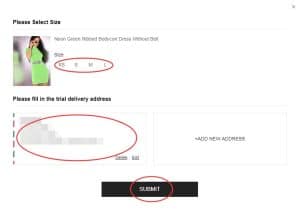
Size selection and address check screen
3
Check Your Winner Results
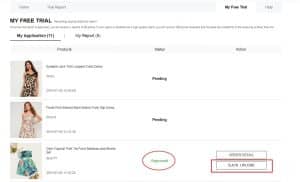
The wait time is usually one week. Look inside “My Free Trial”. If it says “Approved”, the seller will ship your item. If it says “Not Approved”, the sample was awarded to another user.
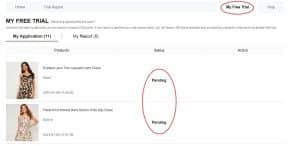
Status page where you verify your request updates
4
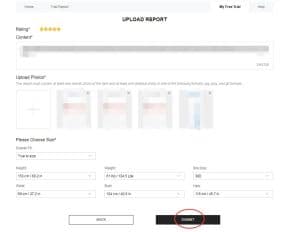
Publish Your Review and Photos
When your parcel arrives, try the item on and inspect the quality. Write a sincere review and add sharp pictures (1 wearing the item and 2 showing detail close-ups). You have 10 days to submit it under “My Report”.
Dashboard to type your opinion and add images
5
Collect Points for App Savings
Open My Report to check your review status. Once accepted, you get 20 bonus points. If your review gets tagged as a “Quality Report”, you will get 100 extra points.
Points credited to your account after report approval
6
Fix Your Review If It Was Not Approved
If your post shows Rejected, don’t worry: the app gives you 1 chance to fix it. Tap the report, click Resubmit, write more details, upload clearer pictures, and send it again.
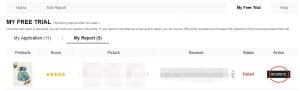
Button to update reviews that require fixes
How to Write a Review That Passes:
Use these simple ideas so your reviews get approved fast:
• Be honest about how the item fits and feels.
• State clearly if the item matches the size chart measurements.
• Take pictures in a well-lit room without dark shadows.
• Add helpful pointers to guide other buyers in the community.
Good to know: Normal approved reviews give 20 points. Top-quality reviews receive 100 extra points.
Mistakes to Stay Away From
Avoid these mistakes so you don’t lower your winning score:
❌ Leaving your chest, waist, and hip measurements blank in the app
❌ Entering a shipping address that belongs to a different country
❌ Requesting free items right before the weekly catalog resets
❌ Writing super short texts or uploading blurry pictures
❌ Taking longer than the 10-day limit to submit your feedback
❌ Ignoring a rejected review instead of fixing and resubmitting it
❌ Using the account only to claim free items without browsing normally
“I applied every single week and never won. I changed my strategy: I measured my waist and hips, saved them in my profile, and sent my requests on the exact refresh day. The very next week, I was chosen for a free coat!”
— Chloe B., regular shopper ⭐⭐⭐⭐⭐
Important Program Rules
• Every user can apply for up to 3 products per week.
• Your shipping address must match your registered country.
• Regular shipping for sample items carries zero cost.
• You must submit your review within 10 days of delivery.
• If your review is rejected, you get 1 extra chance to edit it.
• Using duplicate accounts will result in losing access to the program.
• Skipping your review will hurt your chances of winning again.
Frequently Asked Questions
Do I have to pay for delivery?
No, standard delivery for won items is 100% free.
How many items can I ask for every week?
You can select up to 3 items every 7 days.
What should I do if my review gets rejected?
Go to My Report, click Resubmit, add more details to your text, upload clearer photos, and send it again.
Do I need to send the clothes back later?
No, the product is yours to keep permanently after you finish the review.
Available stock is limited and runs out quickly. To win more often, log into the app on restock day, submit your picks early, and post detailed reviews.
Go to Free Trial Center
Check today’s item list, send your 3 requests for the week, and track your results inside the app.
OPEN FREE TRIAL CENTER
This link takes you straight to the feature inside the app.